My Proxmox host and my TrueNAS share one UPS: an APC Smart-UPS SMT1500RMI2U with an AP9630 (NMC2) network management card. No USB cable, just Ethernet/SNMP.
Until now NUT ran as a container on the Proxmox host and served everything else. That’s a classic single point of failure: if Proxmox goes down first, the NUT server goes with it and nobody else gets told anything.
The design
- No master/slave. Each host polls the UPS card itself over SNMP and shuts itself down.
- Staggered thresholds: Proxmox shuts down at 50% battery, TrueNAS only at 40%. That way every VM/container writing to NAS shares is already stopped cleanly before the NAS goes down (consumer before provider).
- Read-only SNMP community. No host can accidentally cut power to the shared UPS, even though NUT runs locally as
primary.
Part 2 covers the TrueNAS side. This part is about Proxmox VE 8 (Debian 12, NUT 2.8.0).
1. Enable SNMP on the AP9630
Out of the box the card doesn’t answer SNMPv1 queries. In the card’s web interface:
- Configuration → Network → SNMPv1 → Access: tick “Enable SNMPv1 access”
- Configuration → Network → SNMPv1 → Access Control: community
publicwith access type Read. Set the NMS IP to0.0.0.0(any host) or, better, restrict it to your own hosts.
SNMPv1 is unencrypted. That’s acceptable on a trusted management VLAN; if you want it cleaner, use SNMPv3, which NUT supports too.
Before anything else, check that the host can actually reach the card (in these examples the card is at 192.168.1.50):
|
1 2 |
apt install snmp snmpget -v1 -c public 192.168.1.50 .1.3.6.1.4.1.318.1.1.1.1.1.1.0 |
If it returns the model (e.g. “Smart-UPS SMT1500…”), you’re good. A timeout almost always means a wrong IP, a routing/VLAN issue, or SNMPv1 not yet enabled on the card.
2. Install NUT
Debian splits NUT into several packages. The SNMP driver lives in its own package, which is easy to miss:
|
1 |
apt install nut-server nut-client nut-snmp |
3. Configuration
Four files under /etc/nut/.
/etc/nut/nut.conf: the host only looks after itself:
|
1 |
MODE=standalone |
/etc/nut/ups.conf:
|
1 2 3 4 5 6 7 8 9 |
[smt1500] driver = snmp-ups port = 192.168.1.50 community = public snmp_version = v1 mibs = apcc pollfreq = 15 override.battery.charge.low = 50 ignorelb |
- For
snmp-ups,portis the card’s IP, not a device path. mibs = apccis right for the AP9630.autousually works too; if the driver won’t bind, setapccexplicitly.override.battery.charge.low = 50together withignorelbmakes NUT raise low-battery itself at 50% instead of waiting for the UPS’s own (much later) low-battery flag. This is where you set the host’s threshold.
Note: with ignorelb, NUT triggers on either battery.charge ≤ 50 or the UPS’s battery.runtime.low. At light load the percentage threshold trips first.
/etc/nut/upsd.users:
|
1 2 3 |
[upsmon] password = A-STRONG-PASSWORD upsmon primary |
/etc/nut/upsmon.conf: the file ships with lots of commented examples; these two lines are what matters:
|
1 2 |
MONITOR smt1500@localhost 1 upsmon A-STRONG-PASSWORD primary SHUTDOWNCMD "/sbin/shutdown -h +0" |
The password must match in both files. There’s deliberately no power-off command for the UPS: it’s still powering the TrueNAS. With a read-only community it wouldn’t work anyway.
4. Start and verify
|
1 2 |
systemctl restart nut-server nut-monitor systemctl enable nut-server nut-monitor |
If the driver doesn’t come up the first time (Debian generates the driver units from ups.conf), this helps:
|
1 2 |
systemctl restart nut-driver-enumerator systemctl restart nut-server |
Then check:
|
1 2 3 |
upsc smt1500@localhost battery.charge # current charge upsc smt1500@localhost battery.charge.low # must be 50 upsc smt1500@localhost ups.status # OL = on line power |
The log should show a line like UPS: smt1500@localhost (primary) (power value 1) with no “Login failed” after it:
|
1 |
journalctl -u nut-monitor -n 20 --no-pager |
5. Optional: notifications to Mattermost
NUT can run a script on every event. I send them to a Mattermost channel through an incoming webhook, with a colored bar by severity. (Create the webhook under Integrations → Incoming Webhooks. The URL works like a password, so keep it secret.)
/etc/nut/notify.sh:
|
1 2 3 4 5 6 7 8 9 10 11 12 13 14 15 16 17 18 19 20 21 22 23 24 25 26 27 28 29 30 31 |
#!/usr/bin/env bash # Push NUT events to Mattermost via incoming webhook MM_URL="https://mattermost.example.com/hooks/xxxxxxxxxxxxxxxxxxxxxxxxxx" MM_CHANNEL="" # optional: override the webhook's default channel MSG="$1" # upsmon passes the message as argument 1 TYPE="${NOTIFYTYPE:-UNKNOWN}" # ...and the event type in this env var case "$TYPE" in ONBATT) EMOJI=":zap:"; COLOR="#E0A800" ;; ONLINE) EMOJI=":white_check_mark:"; COLOR="#28A745" ;; LOWBATT) EMOJI=":battery:"; COLOR="#DC3545" ;; FSD|SHUTDOWN) EMOJI=":octagonal_sign:"; COLOR="#DC3545" ;; COMMBAD|NOCOMM) EMOJI=":question:"; COLOR="#E0A800" ;; COMMOK) EMOJI=":link:"; COLOR="#28A745" ;; REPLBATT) EMOJI=":warning:"; COLOR="#E0A800" ;; *) EMOJI=":information_source:"; COLOR="#6C757D" ;; esac TEXT="${EMOJI} **UPS ${TYPE}** on `$(hostname)` – ${MSG}" # Build JSON safely (escapes quotes/newlines in the message) PAYLOAD=$(TEXT="$TEXT" COLOR="$COLOR" CH="$MM_CHANNEL" python3 -c ' import json, os p = {"attachments": [{"color": os.environ["COLOR"], "text": os.environ["TEXT"]}]} if os.environ.get("CH"): p["channel"] = os.environ["CH"] print(json.dumps(p)) ') curl -s -X POST -H "Content-Type: application/json" -d "$PAYLOAD" "$MM_URL" >/dev/null |
|
1 2 |
chown root:nut /etc/nut/notify.sh chmod 750 /etc/nut/notify.sh |
Then wire it up in /etc/nut/upsmon.conf. The EXEC flag is the important part; without it upsmon logs the event but never runs the script:
|
1 2 3 4 5 6 7 8 9 |
NOTIFYCMD /etc/nut/notify.sh NOTIFYFLAG ONBATT SYSLOG+WALL+EXEC NOTIFYFLAG ONLINE SYSLOG+WALL+EXEC NOTIFYFLAG LOWBATT SYSLOG+WALL+EXEC NOTIFYFLAG FSD SYSLOG+WALL+EXEC NOTIFYFLAG SHUTDOWN SYSLOG+WALL+EXEC NOTIFYFLAG COMMBAD SYSLOG+EXEC NOTIFYFLAG COMMOK SYSLOG+EXEC NOTIFYFLAG REPLBATT SYSLOG+EXEC |
|
1 |
systemctl restart nut-monitor |
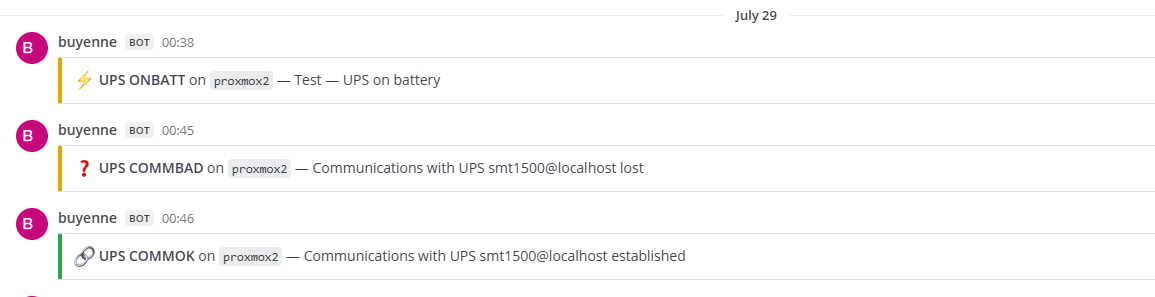
Test without a power cut, first just the webhook:
|
1 |
NOTIFYTYPE=ONBATT /etc/nut/notify.sh "Test – UPS on battery" |
Then the full path through upsmon: stop nut-server for about 20 seconds and start it again. You should get a COMMBAD and then a COMMOK in the channel. This is safe as long as the UPS is on line power (OL): losing comms only forces a shutdown if the UPS was last seen on battery.
|
1 2 3 |
systemctl stop nut-server sleep 20 systemctl start nut-server |
Pitfalls
- Forgetting nut-snmp: without that package there is no
snmp-upsdriver. - SNMPv1 not enabled on the card: the most common cause of timeouts.
- No COMMOK after a restart: on a clean first connection upsmon stays quiet. COMMOK only fires after a previous loss of comms.
- Short network blips over SNMP tend to produce a COMMBAD/COMMOK pair. If that gets noisy, drop those two flags and only report the power events.
- Guest shutdown timeouts: Proxmox stops all VMs/containers while shutting down. Their combined timeouts have to fit in the window between 50% and 40%, or the NAS is gone before the last VM is done.
- BIOS: enable “power on after AC loss”, or the servers stay off when the power comes back.
Finally: actually test it
A config that looks right and one that shuts the host down cleanly at the right moment are two different things. In a maintenance window, pull the UPS’s mains plug (or simulate a power failure from the card) and watch: OL → OB → OB LB, Proxmox goes down at 50%, TrueNAS follows at 40%.
Continue with Part 2: TrueNAS SCALE.